

When a user queries an LLM, the engine doesn’t launch a single search. It triggers dozens in parallel. If you don’t monitor these sub-queries, you are blind to the majority of your visibility surface.
The Essentials:
- LLMs (GPT, Gemini, Perplexity) fragment each prompt into dozens of parallel sub-queries — this is query fan-out.
- Your brand may be missing from 80% of these sub-queries without you knowing it, because traditional tools don’t track them.
- Language bias worsens the problem: 43% of fan-outs remain in English even when the prompt is in another language.
- Monitoring your presence at the fan-out scale — not just the initial prompt — is the only way to manage your LLM visibility.
The Problem: You only see a fraction of your LLM visibility
Most marketing and product teams interested in their presence within LLM responses make the same mistake: they manually test a few prompts, check if their brand appears in the response, and draw conclusions from there.
The problem is that this approach ignores the fundamental mechanism that produces the answer: query fan-out.
What actually happens when a user asks a question
When a user types a prompt into ChatGPT, Gemini, or Perplexity, the engine doesn’t look for a direct answer to that single question. It decomposes it into specialized sub-queries, executes them in parallel, aggregates the results, and then synthesizes a unified response.
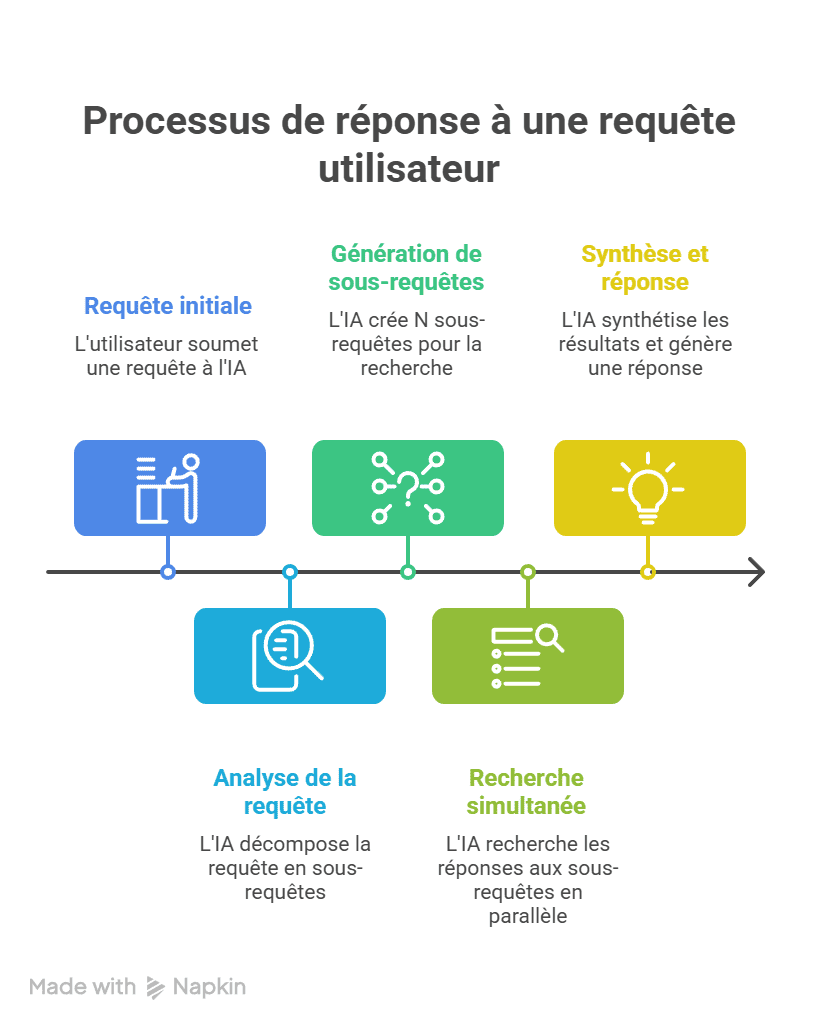
In practical terms, a prompt like “What tool should I use to track my visibility in AI responses?” doesn’t generate one search. The LLM might produce 10 to 30 distinct sub-queries: definitions, tool comparisons, user reviews, pricing, alternatives, industry-specific use cases…
The Blind Spot
If your tracking tool only tests the initial prompt, you are measuring your visibility on 1 query while the LLM has executed 20 or 30 to build its answer. You are missing out on the majority of touchpoints where your brand could have appeared — or was excluded.
Anatomy of Fan-out: How LLMs Select Your Competitors
Query fan-out is not a theoretical concept. It is a documented mechanism, notably in the Google patent (synthetic queries) “Search with Stateful Chat” (US20240289407A1, August 2024), and has been observed empirically through several recent studies.
For a product or marketing team, the technical inner workings of fan-out are less important than understanding where the selection happens.
Each sub-query is a distinct competitive field
Take an example in our industry. A user asks: “What is the best AI visibility monitoring tool?”
The LLM will potentially generate sub-queries covering:
| Sub-query Type | Generated Example | What’s at Stake |
|---|---|---|
| Listing | “AI visibility monitoring tools 2026” | Being in the initial list |
| Comparison | “Cockpyt AI vs Qwairy vs Peec AI” | Competitive positioning |
| Pricing | “AI brand monitoring tool pricing” | Appearing in cost evaluations |
| Reviews | “Cockpyt AI review” | Trust signals |
| Use case | “LLM visibility tracking for SaaS” | Sector relevance |
| Alternative | “Otterly alternative for LLM tracking” | Capturing competitor traffic |
If your brand is only present in 2 of these 6 facets, the LLM won’t have enough signals to include you in its final response. The synthesis favors entities that appear consistently across sub-query results.
Product Implication
Monitoring LLM presence at the prompt level is insufficient. You must track visibility by fan-out facet: listing, comparison, pricing, reviews, use case, alternative. This is what structured tracking by query type enables.
Language Bias: An invisible filter excluding non-English brands
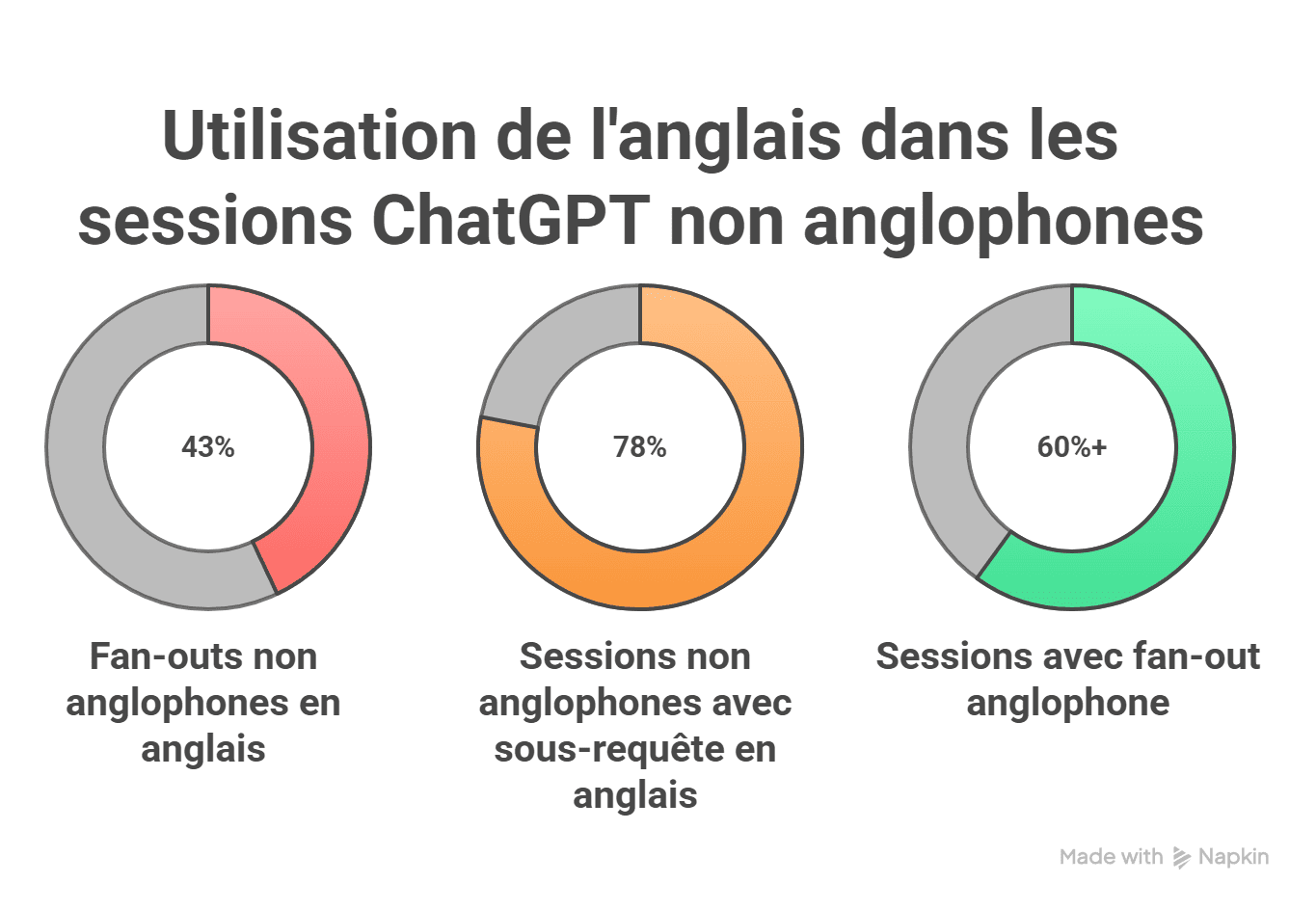
Fan-out doesn’t just fragment queries: it translates them. And this is where the problem becomes structural for any brand operating outside the English-speaking market.
- 43% of ChatGPT fan-outs for non-English prompts are formulated in English
- 78% of non-English sessions include at least one sub-query in English
- 60%+ of sessions with English fan-outs, regardless of the non-English market
Source: Peec AI study, February 2026 — over 10 million prompts analyzed, approximately 20 million fan-out queries.
What this means for your tracking
If you only monitor prompts in your market’s local language, you are ignoring nearly half of the sub-queries actually executed by the LLM. Your visibility dashboard is showing a score that doesn’t reflect the reality of the AI’s decision-making process.
Direct Consequence
A leading French brand in its market could be completely absent from English fan-outs — and therefore from the final response — without its monitoring tool detecting the problem. Tracking must cover both languages to reflect real LLM behavior.
How to retrieve ChatGPT query fan-outs: the concrete workflow (April 2026)
Before monitoring anything, you need to be able to see the sub-queries that ChatGPT actually generates. By default, the interface only shows cited sources — not the background searches.
Important note: extraction methods have evolved rapidly. What worked at the end of 2025 doesn’t necessarily work today. Since the deployment of GPT-5.3 as the default model, OpenAI has removed fan-out data from the conversation JSON accessible via the browser. Extensions and tools that scraped this frontend data have been impacted. Here is the current state of affairs — and what still works.
Method 1: Browser DevTools — works, but no longer on the default model
For over a year, the standard method was to open Chrome DevTools, filter network requests, and read the fan-outs directly from the conversation JSON. Since GPT-5.3, the search_model_queries field has disappeared from the payload visible in the browser for this model.
The method remains functional if you manually select a compatible model (GPT-4o, o3, o4-mini) before launching your prompt. Here is the procedure:
- Choose the right model. In ChatGPT, click the model selector and switch to GPT-4o or o3. If you stay on the default model (GPT-5.3+), fan-outs will not be visible in the JSON.
- Ask a prompt that triggers a web search. Examples: “What are the best AI visibility monitoring tools in 2026?”, “Comparison Cockpyt AI vs Qwairy”. General knowledge questions do not trigger fan-out. The most reliable triggers are terms like “best,” “top,” “review,” “vs,” “2026,” “comparison,” “free,” and local intent queries.
- Wait for the full response to load, including sources and citations. If ChatGPT doesn’t show sources, it answered from its training data — no fan-out to retrieve.
- Copy the conversation ID from the URL bar. It’s the alphanumeric sequence after
/c/— for example,68f1007d. - Open DevTools: Right-click anywhere on the page → Inspect (or
Ctrl+Shift+Ion Windows,Cmd+Option+Ion Mac). - Go to the Network tab. Note: DevTools must be open before refreshing the page, or the network requests won’t be captured.
- Refresh the page (
Ctrl+R). Dozens of requests will appear in the list. - Filter by your conversation ID — paste it into the filter bar of the Network tab. Look for a request of type
fetchorxhr. - Click the filtered request, then open the Response tab (not Headers, not Preview — Response).
- Use
Ctrl+Fand search forsearch_model_queries. If a web search was triggered, you will see the exact queries sent by ChatGPT to Bing, in plain text.
If you cannot find search_model_queries
- You are using GPT-5.3 or newer — OpenAI removed this field from the JSON for these models. Switch back to GPT-4o or o3.
- ChatGPT did not trigger a web search — try a more transactional prompt with a time marker (“best X in 2026”).
- DevTools were not open before the refresh — the network requests were not captured. Reopen and refresh again.
Method 2: Specialized Chrome Extensions — check model compatibility
Several Chrome extensions automate the extraction of fan-out queries directly in the ChatGPT interface. They intercept network requests and display them in an overlay. However, since the GPT-5.3 format change, not all are up to date. Before installing an extension, check its changelog to see if it supports recent models.
| Extension | What it does | Compatibility April 2026 |
|---|---|---|
| Keyword Surfer (Surfer SEO) | Displays fan-out queries + associated search volume | Supports o3, o4, o4-mini. Free. |
| Keywords Everywhere | Integrated fan-out widget with search volume | Free and paid plans. Volume on fan-outs. |
| ChatGPT Search & Fan-outs Capture (RESONEO) | Captures fan-outs, citations, product carousels, entities, brand mentions | Updated post-GPT-5. TSV export, analytics dashboard, fan-out type detection (Search, Shopping, Images). |
| AI Search Fan-out Tracker | Automatic query capture + CSV export | Updated for o3 and GPT-5. Also supports Gemini. |
| LLMrefs Query Extractor | Query + source extraction in one click | Also displays URLs crawled by ChatGPT. |
These extensions solve the manual effort problem but share two limits: they only capture fan-outs from your own conversations, and their functionality depends on OpenAI’s payload structure — which can change at any time, as GPT-5.3 demonstrated.
Method 3: The OpenAI API — the only reliable method at scale in March 2026
Since fan-out data disappeared from the web interface for GPT-5.3+, the OpenAI Responses API remains the most reliable channel to retrieve sub-queries. Fan-outs are still accessible there, even on the latest models.
The principle: you send a prompt via the API with the web_search parameter enabled, and you retrieve the generated sub-queries, crawled sources, and the full response in a structured JSON. Python scripts can execute this in batches for hundreds of prompts.
This is the only approach that allows you to:
- Extract fan-outs on all models, including GPT-5.3+ where DevTools no longer work
- Test hundreds of prompts in batch
- Compare fan-outs across models (GPT-4o, o3, o4, GPT-5.x) — studies show that GPT-5.4 generates an average of 8.5 fan-outs per prompt, compared to about 1 for GPT-5.3
- Measure the stability of sub-queries over time
- Detect English fan-outs generated from non-English prompts
This is what we do with our tool, Cockpyt AI.
Which method to choose?
| Need | Recommended Method | Cost |
|---|---|---|
| Quick diagnosis on 5-10 prompts | Chrome extension (on compatible model) or DevTools on GPT-4o/o3 | Free |
| Regular monitoring of key queries | Updated Chrome extension (Keyword Surfer, RESONEO, AI Search Fan-out Tracker) | Free to Freemium |
| Systematic analysis at scale, all models | OpenAI API (Responses + web_search) via Cockpyt AI | Paid |
Access to Fan-outs is Closing
The trend is clear: OpenAI is progressively reducing the visibility of sub-queries in the web interface. What was freely accessible via DevTools in 2025 now requires either a specific model or API access. GEO tools that relied solely on frontend scraping must migrate to API data sources. If you are building a monitoring strategy, go straight to an API-first approach — it’s the only one that won’t break with OpenAI’s next update.
The specific method doesn’t matter as much as moving from “manually testing a prompt” mode to “understanding how the LLM decomposes queries in my market.” Without this visibility into actual sub-queries, any GEO content strategy is based on assumptions.
What actually needs to be measured: Fan-out KPIs
The shift from classic SEO to LLM visibility monitoring requires new indicators. Usual metrics (position, CTR, impressions) don’t capture the fan-out mechanism. Here are the KPIs that matter when managing your presence in generative answers.
| KPI | What it reveals | Why fan-out changes the game |
|---|---|---|
| Mention Rate per Facet | How many types of sub-queries your brand appears on | Presence on 2/6 facets = a weak signal for the LLM |
| LLM Share of Voice | Your share of mentions vs. competitors in responses | Fan-out multiplies competitive citation opportunities |
| Linguistic Coverage | Presence in English vs. local language fan-outs | 43% of visibility surface is in English by default |
| Sentiment per Facet | The tone associated with your brand in each sub-query type | Negative sentiment on a “review” facet impacts the global synthesis |
| Rank in Synthesis | Your brand’s position in the order of the final answer | Reciprocal Rank Fusion aggregates positions across all sub-queries |
Three immediate actions to regain control
Understanding fan-out is one thing. Acting is another. Here are the three levers that have a direct impact on your visibility in LLM responses — from a content perspective, not a code one.
1. Map your missing facets
List the types of sub-queries the LLM generates in your field (listing, comparison, pricing, review, use case, alternative, integrations). For each facet, check if indexable content exists on your domain or on third-party sites that mention you. Facets without coverage are your blind spots.
2. Double your surface area with English content
The data is clear: nearly half of fan-outs are in English, regardless of the market. Strategic pages — product pages, comparisons, vertical landing pages — must exist in English. This isn’t about international SEO; it’s about visibility within the fan-out mechanism itself.
3. Monitor by facet, not by prompt
A dashboard that tests 50 prompts and counts mentions is no longer enough. Monitoring must break down results by sub-query type to identify precisely where your brand is winning and where it is absent. This is the only way to prioritize content actions with measurable ROI.
Is your brand visible in fan-outs?
Cockpyt AI tracks your mentions and citations in responses from GPT, Gemini, Claude, and Perplexity — by facet, by language, by competitor.
Frequently Asked Questions
What is the difference between query fan-out and classic query expansion?
Query expansion enriches a query with synonyms or corrections. Fan-out is a multi-step process: the LLM decomposes the query into autonomous sub-queries, executes them on multiple sources in parallel, and then merges the results. It is a synthesis pipeline, not a simple lexical expansion.
Do all LLMs use query fan-out?
Engines with integrated search functionality (ChatGPT Search, Gemini, Perplexity) all use some form of query decomposition. The intensity of fan-out varies by prompt type: evaluative and comparative queries (“best,” “top,” “vs”) generate significantly more sub-queries than simple factual questions.
Can we see the sub-queries generated by an LLM?
Perplexity sometimes displays searches performed in its interface. For ChatGPT and Gemini, sub-queries are not visible to the end user. Large-scale analysis (like Peec AI’s study of 20 million fan-out queries) requires specific methodologies for observing traffic and logs.
Does fan-out make classic SEO obsolete?
No. Simple factual queries trigger little fan-out, and classic SEO remains the dominant channel for this type of research. Fan-out mainly impacts queries with high decision-making stakes — precisely those that generate the most commercial value. The two approaches are complementary.
Why do English fan-outs impact non-English brands?
Because LLMs silently translate part of the sub-queries into English, even when the user writes in another language. Since the English corpus is larger, the AI finds more results there — and brands that do not have an English web presence are excluded from these sub-queries before the ranking stage even begins.